

Yes!
OpoShop supports subscription-based business models, making it easy to offer exclusive digital content to paying members.
How Subscriptions Work
You can create subscription plans, such as monthly or annual memberships, that allow customers to:
- Create an account
- Subscribe to a membership plan
- Access and download your digital products while their subscription is active
Set Up a Subscription Plan
To configure subscriptions for your store:
- Go to your OpoShop dashboard.
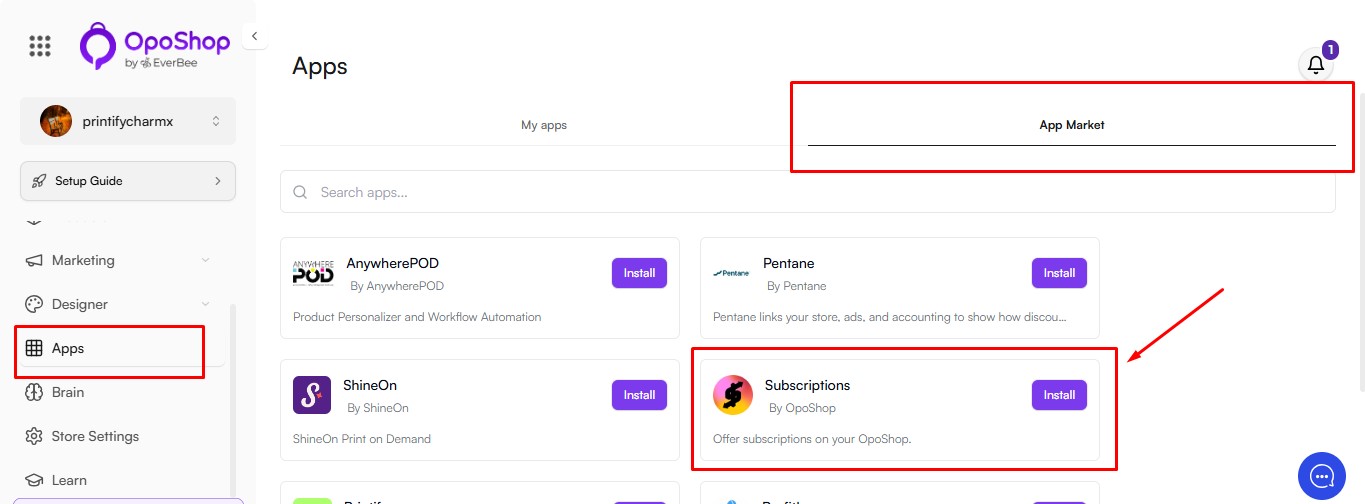
- Navigate to Apps > App Market.
- Select the Subscriptions app and follow the setup instructions to create your subscription plans.
- To access your installed apps, go to the My Apps tab.
Once your subscription plans are configured, customers can subscribe to your store and access your exclusive digital products according to the plan they purchase.
Note: You have full control over your subscription pricing, plan options, and the content included with each membership.
Region-Specific Access
OpoShop currently supports e-commerce businesses based in the United States.
Currently, OpoShop is only available for USA-based e-commerce. While sellers in other parts of the world can explore the platform, features such as blocking traffic from specific regions or restricting digital downloads outside North America are not yet available.
We understand how important regional controls are, especially when it comes to digital tax regulations (like those in the EU). While this functionality is not yet built in, it is on our product roadmap, and we hope to support additional regions and advanced location-based access settings in the future.
Good to know: We'll notify you when these features become available.
Summary
With OpoShop, you can:
- Create a subscription-based store for digital products.
- Set up subscription plans from Apps & Integrations > All Apps.
- Customize your subscription pricing, plan types, and included content.
Note: OpoShop currently supports U.S.-based e-commerce only.
If you have any questions, our Support team is always happy to help. Contact us at hello@everbee.io or simply send us a message through the support chat.